고정 헤더 영역

상세 컨텐츠
본문
데이터 전달하기 (js)
 fetch('/api/give', {
        method: 'POST',
        headers: {
            'Content-Type': 'application/json'
        },
        body: JSON.stringify(dataToSend)
    })
        .then(response => {
            if (response.ok) {
                console.log('데이터를 서버로 전송했습니다.');
            }
        })
        .catch(error => {
            console.error('데이터 전송 중 오류 발생: ' + error);
        });
데이터 받기 (js)
    fetch("/api/hello")
        .then(response => response.text())
        .then(data => {
            console.log(data);
        });
서버 (java)
@RestController
@RequestMapping("/api")
public class testHello {
    int n = 0;
    @GetMapping("/hello")
    public int sayHello(){
        return n;
    }

    @PostMapping("/give")
    public int giveHello(@RequestBody int n1){
        n = n1;
        return n;
    }
}
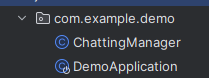
실행시 404 에러가 뜬다면
Mapping경로가 잘못됨
or
클래스 위치가 잘못됨
전체코드
package com.sorryp.helloworld.controller;


import org.springframework.web.bind.annotation.*;

@RestController
@RequestMapping("/api")
public class testHello {
    int n = 0;
    @GetMapping("/hello")
    public int sayHello(){
        return n;
    }

    @PostMapping("/give")
    public int giveHello(@RequestBody int n1){
        n = n1;
        return n;
    }
}
<!DOCTYPE html>
<html lang="en">
<head>
<meta charset="UTF-8">
<title>My Title</title>
<link rel="stylesheet" href="style.css">
</head>
<body>
<div class="banner_top">
</div>
<div>
<button id="testBtn">Get Data</button>
<button id="receiveBtn">Send Data</button>
</div>
<script src="script.js"></script>
</body>
</html>var btn = document.getElementById("testBtn");
btn.onclick = function() {
fetch("/api/hello")
.then(response => response.text())
.then(data => {
console.log(data);
});
};
var re = document.getElementById(("receiveBtn"));
var dataToSend = 5;
re.onclick = function(){
fetch('/api/give', {
method: 'POST',
headers: {
'Content-Type': 'application/json'
},
body: JSON.stringify(dataToSend)
})
.then(response => {
if (response.ok) {
console.log('데이터를 서버로 전송했습니다.');
}
})
.catch(error => {
console.error('데이터 전송 중 오류 발생: ' + error);
});
}


